

PicknPost
PicknPost is a mobile app (iOS and Android) for the people who run an organization’s social media. It takes a game, a gameday, a player or a standings table from Mismatch, fills a template with that data, and publishes the result to the organization’s Facebook page and Instagram account. A post is an image, a carousel of up to 10 images, or a story.
It is available to clubs and federations with the PicknPost add-on.
How a post is made
Section titled “How a post is made”Every post goes through the same three steps:
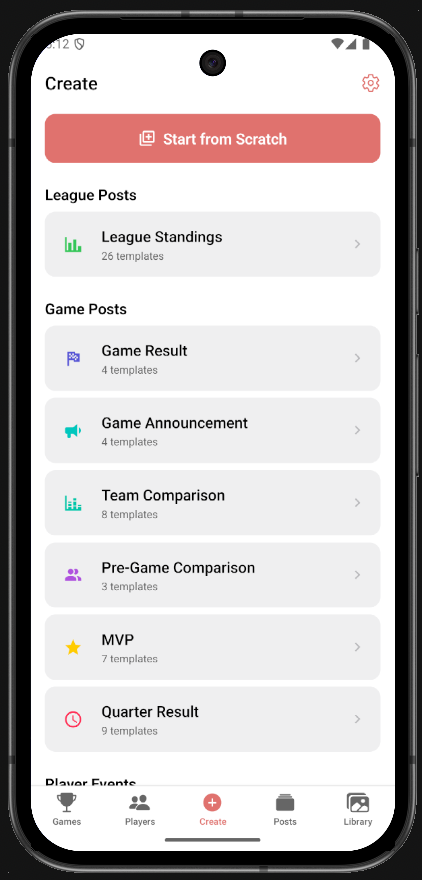
- Create: pick the post type (a game result, a gameday schedule, a player birthday), pick the game, gameday or player it is about, and pick a template. The template opens already filled with the data: team names and logos, scores, quarter breakdowns, the top performer, the standings.
- Edit: adjust the post in the editor. Move and restyle what is there, add text, icons, photos and shapes, add pages, switch between the square, portrait, story and wide shapes. Posts come out in the organization’s own colours and logo.
- Publish: write the caption, choose Facebook, Instagram or both, and publish. A post can also be kept as a draft or exported as images.
The app comes with a library of templates for every post type, each in a square, portrait, story and wide version, and the app picks the variant that fits the data: a quarter breakdown with overtime when the game went to overtime, a results list with as many rows as the gameday had games. A template can be changed in the editor and saved as a template of the organization, so the next post of that type starts from the organization’s own design.
Setup & Accounts covers what an organization needs before the first post: the add-on, a connected Meta account, who can post, and how the app is set up on the phone.